I gave the same ten-step knowledge management workflow to three different models to run from start to finish. Based on my observations, the most noticeable difference was what they did after encountering a step they couldn't solve.
This article compiles my test experience and the three things I need to add in loop engineering to make long processes truly run through.
- Already letting AI run multi-step processes, but often finding it stuck in the middle
- Have several models to choose from, but unsure which complex task to assign to whom
- Want to know how to explain a long process so that AI won't get stuck on a small issue
- Comparison of three types of stuck responses: stopping, seeking discussion, recording and skipping
- A judgment metric: long process completion rate, which is closer to actual use than single-question scores
- A piece of directly copyable long process continuation instruction
Real-world scenario: a ten-step loop
My usual working method is not one question at a time. I give the entire process to AI, letting it run from step one to step ten, without coming back to ask me, and then report the results after it finishes.
The advantage of this method is straightforward: I can leave it running and go away from the computer, then check the results when I come back. Also, because I'm not there, if something goes wrong in the middle, there's no one to take over, making whether the process can finish a very practical issue.
Let me explain clearly what type of task I'm testing, because this will determine how far the conclusions can be extended. I'm running a knowledge management process, not writing code. These four characteristics of this type of process are also the four places where AI is most likely to get stuck:
- Document reasoning I need to extract information from my own notes, verbatim transcripts, and rule files, then use that to make judgments
- Abstract problems Processing things like positioning, classification, and attribution, which don't have standard answers
- High uncertainty The same material can be handled in several reasonable ways, and I need to choose one
- Cross-domain analysis and integration A single workflow involves content, rules, business judgment, and file structure
Out of ten steps, there are usually one or two that are problematic. It could be that the data I provided has blind spots, or that the step is more abstract and the model cannot determine how to judge. This is normal, not an exception
Therefore, I will clearly explain at the beginning: if there is a problem, you should write a work log to report to me, skip it first, and organize the remaining steps
Three types of stuck responses
The first type: it stops waiting for me
I ran the same long workflow with Opus 4.8, and based on my experience with this set of prompts and ten-step workflow, there is a 50% or even about 60% chance it will stop
The stopping point is very regular. Out of ten steps, assuming there are two that are problematic, have blind spots, or are more abstract and the model cannot determine how to judge, it usually can continue if there is only one problem. Once it becomes two, especially if the problem in the fifth step affects the subsequent steps, it is highly likely to stop completely, and the steps after that are not done
When I came back, the view was: it was stuck at the fifth step, and steps six to ten were empty. Even though I had already written 'if there is a problem, skip it'
Second type: find another AI to discuss, solve the problem and continue
Fable I instructed like this: if there is a problem, discuss it with Codex directly, call Codex CLI to discuss, after discussion if there is no problem continue working; if there is a major problem, write a work log to report to me, but first skip it, and execute the following steps. This premise is that I have already set up Codex CLI access rights, and clearly authorized it to seek help.
By running this way, almost all can be executed completely.
Step five has a problem, after discussing with Codex it solves the problem. Step eight has a problem, it may discuss with another model again and solve the problem. When I come back to check, the whole process has reached step ten, among which the results that can be directly used are about seven to eight, the remaining two or three problems that really cannot be solved are written in the report for me to handle.
This is why I previously specified Fable for complex, abstract, and high uncertainty tasks.
- Let two AIs check each other's mistakes: my plan was given a score of 2/5 by a simulated reviewer before it was sent out Using the same input, let both parties run through their processes and then review each other. This is the complete version of making 'discussing with another AI' a fixed process
- Handover instruction: The difficulty is deciding what not to write How to write the handover part so that it won't get worse the more you explain
Third type: if it can't be solved, record it, skip it, and continue running
Today I tested the same running method with Opus 5 Max. My feeling is that it runs Loop more steadily: it often reaches step ten, and also often leaves records.
But its stable way is different from Fable. Fable solves the problem when it encounters a problem; Opus 5 Max I think it may not be able to solve the problem, the more stable thing is when the problem cannot be solved, it skips it and continues executing the following steps.
To me, this progress is very noticeable. What I want is that when it can't solve the problem, it first completes what it can do, don't stop the whole process. Solving it is better, but that is an extra bonus.
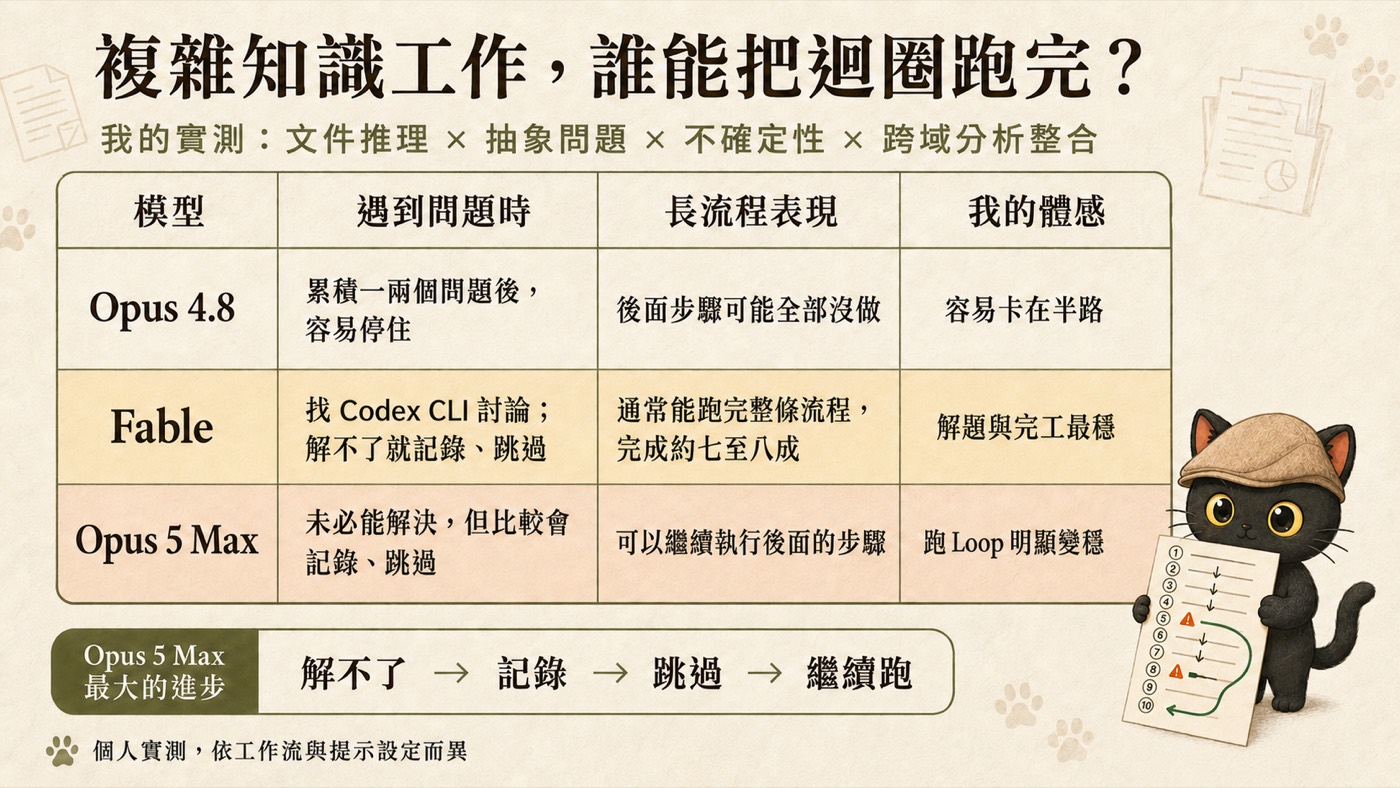
| Model | When encountering a problem | Long process performance | My feeling |
|---|---|---|---|
| Opus 4.8 | After accumulating one or two problems, it is easy to get stuck | The following steps may all be not done | It is easy to get stuck halfway |
| Fable | Looking for Codex CLI discussion; if it can't be solved, record and skip | Usually able to run through the entire process, completing about 70 to 80 percent | Most stable in solving problems and finishing tasks |
| Opus 5 Max | The system may be unable to solve it. It is more likely that it will record the issue and skip ahead. | Can continue to run the subsequent steps | Running Loop clearly becomes more stable |
Opus 5 Max's biggest improvement, summarized in one line is:
What often stops the AI is uncertainty
If you only look at single-question capabilities, the differences between these three models won't be this significant. The gap is pulled out in another situation.
In my long workflow, the step that stops the AI often involves insufficient judgment criteria. The difficulty of a step and its uncertainty may appear together in the same step. However, they are two different things.
The answer is very complex, but the direction is clear. It can be hard-calculated, looked up, or broken into small steps. After completing, you know you did it right.
There is no standard for whether 'this is correct' or not. It needs someone to make the decision. After completing, you don't know if you did it right.
I view this situation as lacking a self-verification converging condition: it finishes without knowing whether it did it correctly. In such cases, stopping to ask you is a reasonable risk control, as it cannot determine whether continuing is appropriate.
The problem is that uncertainty in long processes can spread. If step five is uncertain, step six depends on step five, and step seven depends on step six. At this point, the issue affects an entire sequence of subsequent steps built on unconfirmed foundations. Stopping is indeed safer than proceeding randomly.
However, the third option must have a threshold, otherwise it will take 'pending confirmation' as a pass. My boundary is: only when the subsequent work can be represented with assumptions, branches, or pending confirmation fields can it continue; if the subsequent actions would cause irreversible changes, send data externally, or require the unique correct value to proceed, that branch should stop and record, without proceeding with assumptions.
Long process completion rate: how I currently view the model
I currently assess whether a model can handle long tasks based on this metric. First, define it clearly to avoid confusion with quality:
By separating these calculations, the two numbers do not conflict: In the Fable case, it completed ten steps (high completion rate), with about 70-80% directly usable (quality is separately recorded). In the Opus 4.8 case, it stopped at step five, with the next five steps having no conclusion, so the completion rate is stuck there.
In actual operation, for a ten-step process, inserting one or two unsolvable issues in the middle, we look at four things:
- How far did it get? Did it stop midway or reach the final step?
- Has it recorded the unsolvable parts? Where it got stuck, what it got stuck on, and what it tried.
- Has it continued to complete the steps that can be done afterward? Not abandoning the entire process because one step got stuck.
- Finally, has it clearly explained once? What was done, what was not done, and what needs me to make a decision.
A high single-question score indicates good quality in each step. A high long-process completion rate indicates that you can hand over the task to it and leave the computer. These are two different abilities. For me, who treats AI as a workflow engine, the second is more aligned with actual use.
This also relates to my previous conclusion about calculating AI CP values: the real question is how many points the task requires, and the strongest model may end up being ranked lower. The one point required by a long process is the completion rate.
Three things to add in Loop Engineering
Model behavior changes, which is both good and bad news. The good news is that it keeps improving; the bad news is that you cannot bet the completion rate on the default behavior of a model. What Loop Engineering needs to do is write the completion rate into the process, so it does not fluctuate with model versions.
I added three things in my own Loop.
One, write the recording, skipping, and continuing into explicit rules
Do not just say 'skip if there is a problem.' Write clearly how to record, where to record, and what to do after skipping. My design assumption is that it stops partly because it does not know to what extent skipping this behavior is allowed.
Two, give it an object to ask
The reason why Fable was able to solve the problem that time, I believe, is that I gave it an object to discuss, allowing it to call Codex CLI for discussion. This is called changing a brain in workflow design, relying on division of labor.
An abstract problem that one model cannot solve may provide a different judgment angle when viewed by another model. This is also my usual practice of cross-company review: the output and the main reviewer are not from the same company. This article itself was run this way; after I finished writing, I submitted it to Codex for review, and it found four issues, which I revised above. Making this into a complete fixed workflow process, in Letting two AIs check each other's mistakes that article.
Three, having a stopping condition when stuck
Letting it skip does not mean letting it brute-force. My rule is to skip, record, and move on if the same problem is stuck for a certain number of times or duration. This needs to be hard-coded into the process, otherwise it will use all your time on a single step, which is also a type of infinite loop.
Directly copyable long process continuation instruction
This is the core paragraph I gave to the long process; you can directly modify it to suit your version:
This workflow has N steps: [Paste steps 1 to N, each step with expected output]
Work log is written in: [File or location]
Available tools and permissions: [List them, and which data is not allowed to be sent out]
Each step's limit: maximum 2 attempts, or 15 minutes

Please run from step 1 to step N at once, do not stop to ask me in between.
If you encounter a problem, handle it in this order:

1. Try to solve it yourself, attempt the same problem at most 2 times, not exceeding the time limit.
2. If you cannot solve it, switch brains: under the premise of not sending out unauthorized data,
   summarize the problem, what has been tried, and the options to judge, and discuss it with another model
   (e.g., call Codex CLI). If it can be solved after discussion, continue.
3. If it is still unsolvable, record it, write it into the work log, with fields including:
   - Which step is stuck
   - What is the problem
   - Which subsequent steps are affected
   - What you have tried
   - Available handling directions
   - What needs my judgment
4. After recording, skip this step:
   - If the subsequent steps do not depend on this step, complete them as planned.
   - If the subsequent steps depend on this step, continue only if you can clearly mark 'pending confirmation' or establish a branch assumption,
     and write down what assumption you used and which outputs are affected.
   - If you cannot safely establish an assumption, stop the branch and record it, do not force it.

The following actions are strictly prohibited: irreversible deletion or overwrite, sending out data, spending money,
changing permissions or settings, sending unauthorized data, and any destructive operations I have not authorized.
If you hit a red line, stop this action and all directly dependent steps; other unrelated, read-only steps can continue to finish.

After finishing everything, report once, clearly separated:
- Completed steps and output locations
- Skipped or stopped steps and reasons
- Current pending confirmation assumptions and affected outputs
- Judgment points that need my approval, with options and your recommendations
That red line cannot be skipped. The premise for letting AI run the entire workflow is that it knows which things it is never allowed to run on its own. The branching rules in point 4 also cannot be skipped, otherwise it will take 'pending confirmation' as a pass, building the entire workflow on an unconfirmed assumption.
What it guarantees and what it does not guarantee
This is my personal test, and I focus more on explaining the boundaries than the conclusion.
- This is the difference in my personal experience using the same long workflow in my knowledge management workflow.
- These three reactions are patterns I observed in my workflow. Whether you can reproduce them depends on the version, prompt, tool permissions, and task structure.
- That continuation instruction is what I actually used, and you can directly take it and modify it.
- I give you the feeling probability, not statistical data. Half to six out of ten will stop, which is my personal feeling, and I haven't made a quantitative experiment.
- Model behavior will change with the version, prompt settings, and workflow structure.
- I tested on Opus 5 Max. Whether Opus 5 High will have the same result when running Loop, I haven't tested yet, and this is what I plan to try next.
- The workflow configurations for the three models are not equal (Fable had an extra authorization for Codex CLI), so this cannot be used as a model capability ranking.
- I tested on knowledge management tasks (document reasoning, abstract problems, high uncertainty, cross-domain analysis integration). Switching to programming or data processing tasks, which have clear right and wrong answers and can be automatically verified, the model's stuck behavior is likely completely different. Those types of tasks are less likely to encounter the situation of 'not sure whether to continue'.
If you want to use this article as a basis for selecting a model, I recommend the approach of running it yourself: take your real ten-step workflow, which originally has one or two steps you know will get stuck, and give the same task to different models. See what they return. Find the configuration that best suits your workflow. Your own test is usually more valuable than a general evaluation.
- Use my article writing workflow to explain what Loop Engineering is.
- When I started to understand Loop, I designed the three workflows into Loop.
- Loop Guardrails: Five rules that let AI run automatically within a safe range.
- Model is not the smarter the better: I start learning to calculate AI's CP value
- Let two AIs check each other's mistakes: my plan was given a score of 2/5 by a simulated reviewer before it was sent out
- Handover instruction: The difficulty is deciding what not to write
- Rather than expecting an error-free AI system, design a Loop that can tolerate errors.
Design Loop to be runnable
I host two free online lectures every month, with topics rotating around how to organize workflows, judgments, and experience into AI usable prompts, skill packages, and knowledge bases. If you want to receive course notifications or discuss where your long workflow is stuck, feel free to start from the community.
Free lecture sessions will be announced here first, and you can also bring out the workflow you're stuck on to look at together.
Join the community ↗